Nothing is locked, nothing expires and there is no account to create. Install it from the Microsoft Store, point it at the demo licence below, and you are inside the full application in about two minutes.
Get Wise CRM from the Microsoft Store
The Store carries the program, its runtime and the user manual, installs it for the current user without administrator rights, and keeps it up to date on its own. There is nothing else to download and nothing to unblock.
Microsoft Store · Windows 10/11, 64-bit · free, no account, no expiry
Demo licenced3e40a1b-c3d4-4e5f-8a9b-0c1d2e3f4a5b
This is the public demo licence. A fresh installation already starts on it: the login screen shows DEMO and the demo user, so you only press LOG IN. It stays in the licence list afterwards, so you can always come back to it — real data, every screen, nothing to ask anybody for.
The demo is read-mostly: you can look everywhere, and what you change stays in the demo.
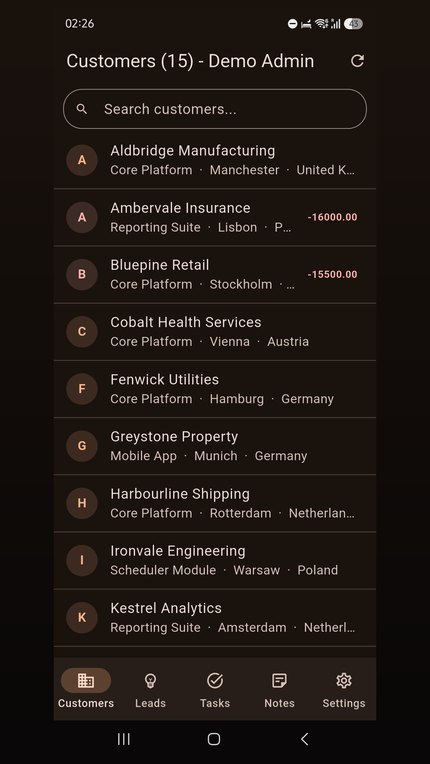
Wise CRM on your phone
The companion app reads the same server as the desktop: customers, leads, tasks and notes, with search on every tab and a contact you can ring or e-mail straight from the list. It is read-only — nothing you do on the phone changes your data.
Both are published: Android on Google Play, iPhone and iPad on the App Store.
From here to your own data, in four steps
Install it from the Store
Open the Store page and press Get. Windows installs Wise CRM, puts it in the Start menu and keeps it up to date from then on.
Look around the demo
A fresh installation opens on the demo licence, so just press LOG IN. If it is not selected, choose DEMO in the licence list on the login screen.
Ask for your own licence
Fill in the short form on the contact page. The licence is created while you wait and its number arrives by e-mail, usually within a minute.
Paste it in, and it is yours
On the login screen, open the licence list and choose its last row, “< enter a licence key... >”, then paste your number into the dialog. The licence is empty, so the program offers to create the first administrator — an e-mail address, a name and a password — and then you are in, with your own data and nobody else's.
Ready for a licence of your own?
It is a directory of your own on our server, and nobody else can see inside it. The form takes a minute and the number arrives by e-mail.